
SecureEmail · Email Encryption & Rights Management
Email Encryption & Rights Management
Why SecureEmail?
Email is the leading cause of data leaks, often due to simple human errors like misdirected messages. SecureEmail eliminates that risk with always-on encryption, full visibility, and persistent controls that stay with every message–so data never leaves your control.
If an email is missent or intercepted, protected content stays unreadable—turning a costly incident into a non-event.
Block the most common internal leak paths–forwarding, copy/paste, printing, and screen capture–so sensitive content stays with the intended recipients. Maintain control over your emails and attachments, even after they’ve been sent.
Share securely without the complexity. SecurePDF lets you send encrypted files to external parties via OTP or password protection, keeping your internal environment locked down and your data protected.
Recipients can verify the sender and detect tampering, reducing spoofing risk and strengthening confidence in high-stakes communications.
SecureEmail:
Email Encryption, Signing and Rights Management
Secure emails in Outlook with PKI encryption, digital signing, and rights controls—even when sending externally
PKI Email Encryption
Encrypt emails with PKI so only intended recipients can read them—even if intercepted or forwarded. parties.
Outlook-native Workflow
Protect emails in Outlook in a few clicks: classify, encrypt, sign, and send.
Right Controls on Emails
Restrict forwarding, copy/print, and screen capture, and set expiry—control stays after send.
External Sharing Ready
Send protected emails via SecurePDF to external recipients without requiring them to install anything.
Proof of Sender
Digitally sign emails so recipients can verify the sender and detect tampering.
Core Controls in SecureEmail
SecureEmail safeguards sensitive email communications
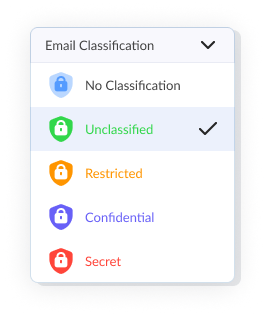
through customizable classification and security controls to keep information safe
Admins can customise levels during installation.

Recipient can verify who sent it and whether it has been altered.
- Forwarding Blocked
- Copy Disabled
- Print Disabled
- Screen Sharing Blocked
SecurePDF—Securely email external recipients without PKI or certificates.
How SecureEmail Works
Alex composes an email in Microsoft Outlook and labels it Confidential using Email Classification.
This classification defines the sensitivity of the message and determines how the email will be protected.
Before sending, Alex selects DRM Protect.
SecureEmail automatically:
- Signs the email to verify it is truly from Alex
- Encrypts the email using Ben’s public key, ensuring only the intended recipient (Ben) can read it
- Applies usage controls to prevent data leakage
No passwords or manual encryption steps are required.
The protected email is sent securely to Ben.
Even while traveling across email servers, the content remains encrypted and unreadable to anyone else.
Ben opens the email normally in Microsoft Outlook.
The email content is readable, but usage restrictions are enforced automatically:
- Forwarding is disabled
- Copying is blocked
- Printing is disabled
- Screen capture and screen sharing show a black screen
Ben can read the email but cannot share it.
If Ben attempts to forward the email to Charlie (unauthorised recipient), SecureEmail blocks the action and displays an error message.
Charlie never receives readable content.
- Alex sends sensitive information with confidence.
- Ben can read it securely but cannot share it.
- Charlie and any unauthorised recipients cannot access the email.
Use cases
SecureEmail is designed for environments where sensitive communications must remain protected at all times–before, during, and after sending. By combining strong encryption with persistent, policy-based controls, it ensures emails and attachments stay secure and under your control wherever they go.
Secure high-stakes financial correspondence and client data against misdirected emails and interception.
- Client Privacy Assurance: SecureEmail uses classification levels to turn your messages into secure vaults. Once set, encryption ensures only recipients that classification level can read the content.
- Recall & Revoke Control: Instantly pull back access to a sent email if it was sent to the wrong person or if a deal’s terms change.
- Audit-Ready Communications: Use digital signatures to create a verifiable record of who accessed your documents, making regulatory reporting effortless.
Ensure HIPAA and research privacy by protecting patient records and academic intellectual property sent via email.
- Sensitive Record Safeguarding: Automatically encrypt medical referrals, lab results, and student records to meet strict privacy standards.
- Research & Data Integrity: Protect proprietary academic research and institutional data from accidental exposure or unauthorized harvesting.
- Simplified Compliance: Replace complex secure portals with a natural email experience that stays fully protected and audit-ready.
Stop intellectual property theft and accidental leaks without slowing down team collaboration.
- Protect Sensitive Data: Secure IP, contracts, customer information, and critical communications in emails and attachments.
- Prevent Accidental Leaks: Reduce “oops” moments by restricting forwarding, copy/paste, and unauthorised sharing.
- Secure Remote Collaboration: Verify authenticity with digital signing and reduce spoofing risks in high-stakes communications.
Frequently Asked Questions
What is SecureEmail?
SecureEmail is an Outlook-based solution that lets users classify, sign, encrypt, and apply usage controls to emails before sending.
Do external recipients need to install anything?
No. By using the SecurePDF feature within SecureEmail, you can send encrypted messages and attachments that recipients open using a simple OTP or password.
How does encryption work?
Emails are encrypted so only the intended recipient can access it—helping prevent leaks from mistakes or cyber threats.
What happens if someone forwards a protected email?
Protection remains enforced; unauthorised recipients won’t be able to access protected content. Forwarding can also be restricted by policy.
How is SecureEmail different from Pretty Good Privacy (PGP) email?
PGP relies on users to verify and trust each other’s identities, which can be more hands-on to set up. SecureEmail uses trusted authorities to handle verification, making it simpler and easier for most users.
Get started with SecureEmail
Start your SecureEmail journey–share it with stakeholders, review the technical details or request a live demo to see it in action.
Understand SecureEmail at a glance–what it does, why it matters, and how it fits your organisation.